The AI Tools Landscape: A TPM's Field Guide
The AI Tools Landscape: A TPM's Field Guide
Over the past month, I've tested every AI tool I could get my hands on. Not as a curiosity exercise — as a working TPM trying to figure out which tools actually reduce overhead vs. which ones just add a new thing to manage.
Here's the honest scorecard.
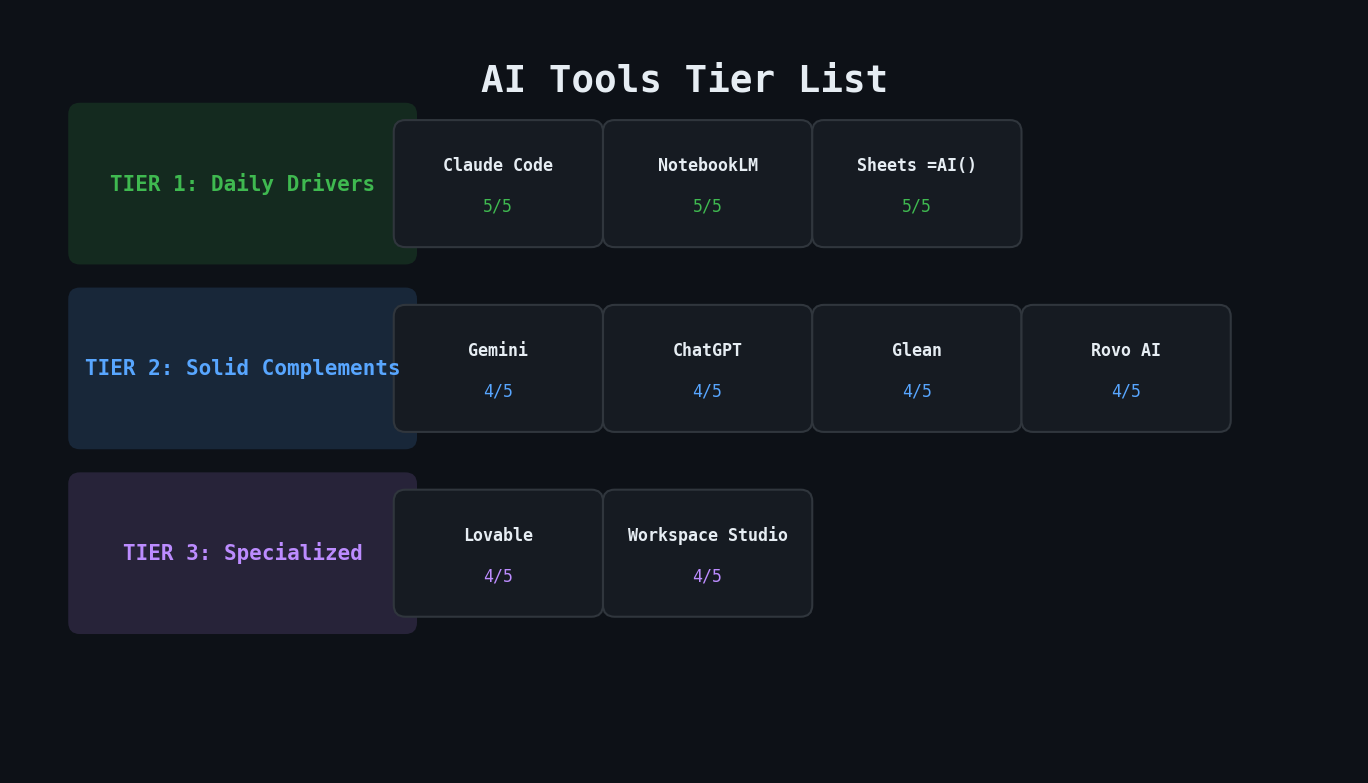
The Tier List
Tier 1: Daily Drivers
Claude Code — Rating: 5/5, Difficulty: Hard
The foundation of my entire agent ecosystem. Terminal-based, integrates with MCP servers (Jira, Confluence, Slack via Glean), and supports autonomous subagents. The learning curve is steep — you need to understand CLAUDE.md configuration, prompt engineering, and MCP protocol. But once set up, it's the most powerful tool in the list by a wide margin.
Best for: Building autonomous workflows, multi-step data synthesis, anything that needs to touch 3+ systems.
NotebookLM — Rating: 5/5, Difficulty: Easy
Google's sleeper hit. Import meeting notes, sprint docs, or any source material and it creates an interactive knowledge base. I use it for sprint retrospective prep — import 2 weeks of standup notes and Gemini meeting transcripts, then ask it to identify patterns, risks, and improvement areas.
Best for: Synthesizing large documents, sprint retro prep, generating summaries from meeting notes. Tip: add sources from Google Docs directly.
Google Sheets =AI() — Rating: 5/5, Difficulty: Medium
The most underrated AI tool. Write =AI("summarize this row", A2:F2) in a spreadsheet and get AI-powered analysis inline with your data. I combine this with Jira data imports to auto-generate status summaries for each initiative.
Best for: In-spreadsheet analysis, combining AI with structured data, quick classifications.
Tier 2: Solid Complements
Gemini — Rating: 4/5, Difficulty: Easy
Google's general-purpose AI. Strong for analyzing tables, generating reports with data visualizations, and quick analysis. Setup Gems (custom personas) for repeated use cases. Can pull sources from NotebookLM.
Best for: Quick analysis, report generation, data visualization from tables.
ChatGPT — Rating: 4/5, Difficulty: Easy
The all-in-one option. Draft reports, populate templates with user data, generate complete drafts from guidelines. Setup Custom GPTs and Personalization for better prompt engineering.
Best for: Report drafting, template population, general-purpose AI tasks.
Glean — Rating: 4/5, Difficulty: Easy
Enterprise search that connects to your company's systems — Slack, Jira, Confluence, Google Drive, GitHub. Powerful for finding information across silos. The AI chat can synthesize across sources.
Best for: Cross-platform search, finding information you know exists but can't locate, Slack thread mining.
Rovo AI — Rating: 4/5, Difficulty: Medium
Atlassian's AI layer. "Ask Rovo" in Jira or Confluence for quick answers about sprint boards, roadmap initiatives, or page content. The Agent feature can evaluate sprint boards and inspect roadmaps.
Best for: Quick Jira/Confluence queries, sprint board evaluation.
Tier 3: Specialized
Lovable — Rating: 4/5, Difficulty: Easy
AI app and website builder. Chat-to-prototype in minutes. Can connect to Supabase for auth and database. Great for vibe coding — turn ideas into working prototypes without writing code.
Best for: Rapid prototyping, internal tool mockups.
Google Workspace Studio — Rating: 4/5, Difficulty: Medium
Automates between Gmail, Google Drive, and Google Sheets using Gemini. Set up pre-meeting prep flows or post-meeting summary automation. Currently testing an automation to send Gemini notes to NotebookLM notebooks.
Best for: Cross-Google-app automation, meeting prep pipelines.
The Integration Stack
The real power isn't any single tool — it's how they chain together:
Meetings → Gemini (auto-notes) → NotebookLM (synthesis)
                                → Claude Code agents (Jira updates)
                                → Google Sheets =AI() (tracking)
Each tool has a sweet spot. NotebookLM excels at making sense of unstructured docs. Claude Code excels at acting on structured data across systems. Google Sheets =AI() excels at inline analysis. Don't try to make one tool do everything.
Key Takeaways
- Easy tools (NotebookLM, Gemini, ChatGPT) give quick wins — start here if you're new to AI tooling
- Hard tools (Claude Code) give compounding returns — the setup cost is high but the automation payoff is exponential
- The best setup combines tiers — easy tools for ad-hoc analysis, hard tools for recurring automation
- Enterprise search (Glean) is the connective tissue — it bridges the gap between siloed systems
- Rate every tool honestly — a 5-star rating means you use it daily, not that it has impressive features