AirSynth v2 — song mode, plate reverb, and 16 patterns
AirSynth v2 — song mode, plate reverb, and 16 patterns
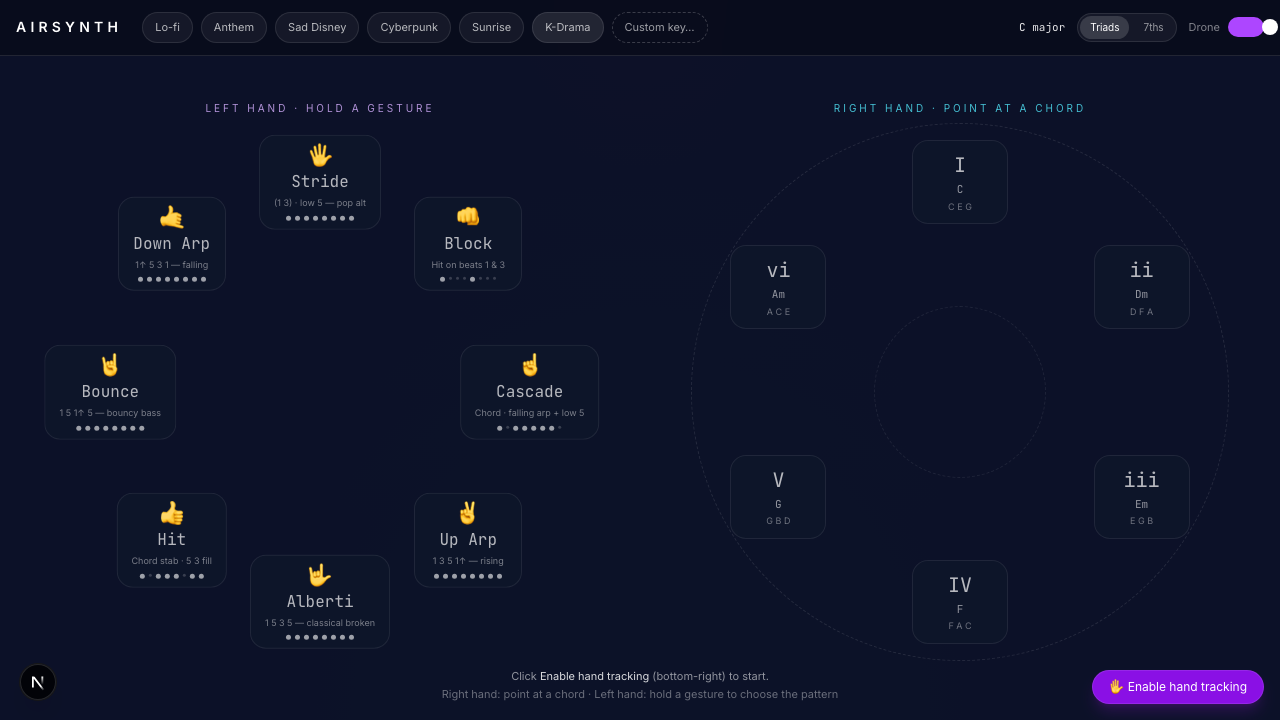
AirSynth started as a 6-chord gesture toy — point at a chord with your right hand, make a shape with your left to pick a pattern, hear piano. Fun for a minute. Not really an instrument.
This update is the version I wanted: load a song, watch the lyrics scroll, follow the chord changes with your hands while singing along. Like jamming with a friend who's already worked out the chart, except the friend is a webcam and some MediaPipe landmarks.
Here's what changed.
Song mode
The biggest shift. Pick from a list of 8 pop songs and AirSynth swaps the generic 7-chord diatonic reel for the song's actual palette — Someone Like You gives you A · E · F♯m · D · C♯m in first-appearance order. Time-synced lyrics fetch from LRClib (free, no auth) and float across the bottom of the screen with chord markers above the right words.
The data model that made this work is what I'm calling phrase-based songs. Instead of one flat array of chords for the whole song, each section is a list of phrases, where one phrase corresponds to exactly one LRC lyric line:
{
  id: "verse",
  label: "Verse",
  phrases: [
    ["A", "E"],                                  // line 1: 2 chord changes
    { chords: ["F#m", "D"], at: [1, 5] },        // line 2: at word 1 and word 5
    ["A", "E", "F#m", "D"],                      // line 3: 4 chords
  ],
}
The at array gives explicit word indices for the rare cases where chord changes need to land on specific syllables (A/G♯ on the second beat of bar 3, that kind of thing). Most lines use the auto-distributed form.
At render time the lyric line and the chord phrase walk in lock-step. Changes never drift across line boundaries — the painful failure mode the first version had when I tried to space chord markers evenly across the section.
Songs shipped:
| Song | Artist | Key | BPM |
|---|---|---|---|
| Love Yourself | Justin Bieber | C | 100 |
| Sorry | Justin Bieber | C | 100 |
| Count on Me | Bruno Mars | C | 92 |
| Just the Way You Are | Bruno Mars | D | 109 |
| Marry You | Bruno Mars | D | 145 |
| Perfect | Ed Sheeran | G | 95 |
| Someone Like You | Adele | A | 135 |
| Let It Be | The Beatles | C | 73 |
The encoder skill
Encoding a song by hand is tedious — read a chart line by line, count chord positions, map slash chords to degrees, decide what pattern fits. I built a Claude Code skill that does it.
Drop 3–6 screenshots of an Ultimate Guitar printable tab (Cloudflare blocks server-side fetching, so screenshots are the reliable path) and say "use the airsynth-song-encoder skill — here's Marry You, key D, 145 BPM". The skill produces a phrase-aligned Song entry with:
- Diatonic degree mapping (
A/G♯→iiiwith a comment explaining the slash-chord substitution) - Default pattern picked to suit the feel (ballad →
albertiorpluck, anthem →strideorblock) chartUrlandchartSource: "Ultimate Guitar"for attribution- A density check (chord positions ≈ LRC line count × 1.5) so phrases don't overflow or underrun
This is the first project-scoped skill I've actually used. Six of the eight shipped songs went in via the skill; the other two were the early manual hand-encoded ones I keep around as the canonical examples the skill points at.
Audio: from synth to sampled piano
v1 used a Tone.js synth. It sounded like a synth. v2 uses smplr's SplendidGrandPiano — Steinway D, four velocity layers — and adds a 10-flavor picker: Grand, Kawai, Steinway B (1895), two Versilian uprights, Bright, Honky-Tonk, Rhodes, Wurlitzer, and CP80.
Mixing libraries was the tricky part. smplr's Reverb constructor failed with parameter 1 is not of type BaseAudioContext when I passed Tone's audio context, because Tone uses standardized-audio-context — a wrapper — and smplr internally checks AudioWorkletNode against the native BaseAudioContext. The wrapper fails the typecheck.
Fix: two audio contexts. Tone keeps its standardized wrapper; smplr gets a fresh native AudioContext. They share destination via connect, and the user-gesture resume() happens explicitly when you click Enable hand tracking. Slightly ugly, completely necessary.
The hollow-at-zero reverb bug
The first time I wired the plate reverb in I expected wet=0 to sound identical to no reverb. It didn't. There was a subtle hollow / phasey character to every note even at zero wet. Carl heard it instantly: "even with reverb = 0% there's still a strong hollow sound."
Turns out smplr's Reverb (and most Dattorro / Freeverb-flavored algorithmic reverbs) run the dry signal through the processor's input bandwidth filter and allpass network even at wet=0. The dry/wet param is the mix inside the reverb — it's not a true bypass.
The fix is parallel dry/wet routing:
source ─┬─→ dryGain (always 1.0) ─→ master ─→ destination
        └─→ Reverb (wet=1, dry=0) ─→ wetGain (0..N) ─→ master
Set the reverb processor to fully wet internally, then mix dry and wet at parallel gain nodes the application controls. At wetGain=0 the source hits the output without any reverb-processor coloration. The result was the single biggest perceived audio improvement of the rebuild: "HUGE improvement, so much better than before." I'm saving the pattern to memory for the next Web Audio reverb I touch.
16 patterns × scale-walking tokens
The pattern library grew from 8 patterns to 16, and the token semantics got a critical fix.
In v1, pattern tokens were chord-relative: 1, 3, 5 meant chord-tone-0, chord-tone-1, chord-tone-2. That works for plain triads but breaks for anything else — 7 had to fall back to chord-tone-3 (the chord 7th if present, undefined if not), and there was no way to encode "the scale note one step above the chord root" which is what real patterns like Yiruma's 1 5 1↑ 2↑ 3↑ 2↑ 1↑ 5 actually do.
v2 tokens are scale steps from the chord root: 1 = root, 2 = next scale degree, 3 = third scale degree, etc. For diatonic chords this lines up perfectly — 3 and 5 are still the chord 3rd and 5th — but now 2, 4, 6 give scale-tone embellishments and 8..14 give the same pattern an octave up. Tokens -1, -3, -5 are chord tones an octave down for bass voicings.
For this to work, the engine has to know the scale. I added audioEngine.setScale(rootKey, scaleType) which propagates the scale to the pattern resolver. There's also a bassDrone flag on most patterns — octave-doubled low root (both -1 and -2 octaves), held for the bar, anchoring the rhythmic figure with a sustained low bass that's basically every pop piano accompaniment ever.
The full list: Stride, Block, Arpeggio, Alberti, Slow Stride, Wave, Down Arp, Roll, Folk, Lift, Stairs, Pop, R&B, Hold, Half Push, Float — plus 8 guitar patterns (Strum, Stab, Travis, Pluck, Classical, Country, Alt Bass, Falling).
Right-hand fillers
A filler swaps the last four eighth-notes of each bar for a melodic motif. 10 concrete fills (Stepwise Down 3↑ 2↑ 1↑ 5, Skip Down 2↑ 3↑ 1↑ 5, Anthem 3↑ 5↑ 1↑ 5, K-Ballad ♭9 1↑ ♯11 5↑, etc) plus a Random mode that picks a different filler per bar with a 25% chance of skipping entirely — gives a more human, less robotic feel.
The non-obvious design decision: fills resolve to the tonic of the key, not the next chord. The first version had them resolve to the next chord and it sounded jarring on every chord change because the fill kept retargeting. Keying them to the tonic makes them feel in-key — they're commenting on the harmony rather than chasing it.
Tension tokens (♭9, 9, ♯11, 13) are resolved at fire-time via Tonal.js against the active chord — so ♭9 in the K-Ballad fill is whatever the flat-ninth above the currently-held chord is, computed live.
What it still doesn't do
It won't pick the chords for you. It won't transcribe your singing. There's no metronome you can hear, no backing drum track (though the Song schema has a placeholder for backingTrack with sourceBpm so the engine can stretch a 30-second drums-and-bass loop to match the song's BPM via playbackRate — I just haven't generated any tracks yet).
The gesture vocabulary is still small. The right hand always points; the left hand only selects from a fixed set of shapes. A two-hand gesture (clap, prayer, point-up) could trigger a transition between sections.
Try it
airsynth.carlfung.dev — desktop browser, grant camera permission, pick a song from the top bar. Make sure your room is reasonably lit so MediaPipe can find your hands.
The code is on GitHub. The encoder skill is at .claude/skills/airsynth-song-encoder/SKILL.md — if you want to add a song, drop UG screenshots into a Claude Code session in the repo.