Shipping from a Phone: Claude Code on a $4 VPS
Traveling with a laptop is a tax. Traveling without one, if you rely on Claude Code every day, feels like an unacceptable loss.
A few trips into this setup, I stopped packing my MacBook for short trips. An iPhone and a $4-a-month server do the job. This is how the pieces fit.
Why a VPS, not a laptop and not a cloud shell
I tried the alternatives first.
Just bring the laptop — works, but carrying a MacBook into a crowded MTR car in Hong Kong feels heavier every year.
Cloud shell or browser IDEs — fine for a one-off fix. But my Claude Code isn't vanilla: specific ~/.claude/ config, a memory folder full of project context, MCPs for Gmail/Slack/Jira/Notion, custom skills, keybindings. Rebuilding that on every fresh cloud shell is not how I want to spend my mornings.
A VPS I own — one-time setup, persistent config, my keys, my history. Same Claude Code, same memory, same everything. From any device that can SSH, I have my full setup.
Step 1 — Provisioning the Hetzner box
I picked Hetzner for three reasons: cheap, ARM (cheaper still), and the console is actually usable. The entry-level ARM server — CAX11, 2 cores, 4 GB RAM, 40 GB NVMe — runs €3.79/month. About $4 USD. I put mine in Helsinki (hel1) for balanced latency across the US/Asia corridor.
Walkthrough:
- Hetzner Cloud console → new project → new server.
- Image: Ubuntu 24.04, ARM64.
- Type: CAX11.
- Location: closest to where you expect to be most (travel-friendly).
- SSH key: paste your public key during creation. Never set a root password — skipping the SSH-key step makes Hetzner email you a temporary password, giving you 24 hours of SSH-with-password open to the internet. Skip that window entirely.
- Cloud Firewall: attach one that allows only SSH (port 22) inbound. Deny everything else.
- Create. Two minutes later, SSH in:
ssh -i ~/.ssh/hetzner_key root@<your-ip>
First things on the box:
apt update && apt upgrade -y
apt install -y fail2ban tmux git curl
systemctl enable --now fail2ban
Fail2ban watches SSH auth failures and auto-bans IPs after repeated bad attempts. On a public-IP VPS, it's not optional.
Step 2 — Installing Claude Code
Claude Code installs via npm:
# Node.js (ARM64 build)
curl -fsSL https://deb.nodesource.com/setup_22.x | bash -
apt install -y nodejs

# Claude Code
npm install -g @anthropic-ai/claude-code

# First run — OAuth flow
claude
# Follow the printed URL, paste the code back, done.
Auth is OAuth for Claude Pro/Max users — you open the URL in any browser (your phone's browser works fine), click through, paste a code back into Claude Code. Less than a minute.
After that, I copied my ~/CLAUDE.md and memory folder from the Mac via rsync. (I've since put that into a git-backed vault — separate post. Start with git from day one if you can.)
Step 3 — An SSH client that's actually good on a phone
I'm on an iPhone, so I use Termius. Android users can do the same thing with Termux from F-Droid, which has a proper package manager — if that's you, pkg install openssh and you're off. For iOS, Termius is what works.
What makes Termius actually usable as a terminal on a phone:
- A modifier-key toolbar above the software keyboard —
Ctrl,Alt,Esc,Tab,|,^C,^I. Every keybinding that lives in muscle memory just works. - Keys in the Secure Enclave. Generate inside the app, the private key never leaves the phone.
- Per-host config. One entry, one tap, you're in.
- A ridiculous little AI command generator in the toolbar, which I never use but is there.
Setup is five minutes:
- Hosts →
+→ new host. - Hostname: the Tailscale name (Step 4) or the Hetzner IP if you're still on public SSH.
- User:
root. - Keys → Generate key → set as default.
- Copy the public key it shows you, paste it into
~/.ssh/authorized_keyson the VPS (via an existing SSH session from your Mac). - Tap the host entry. You're in.
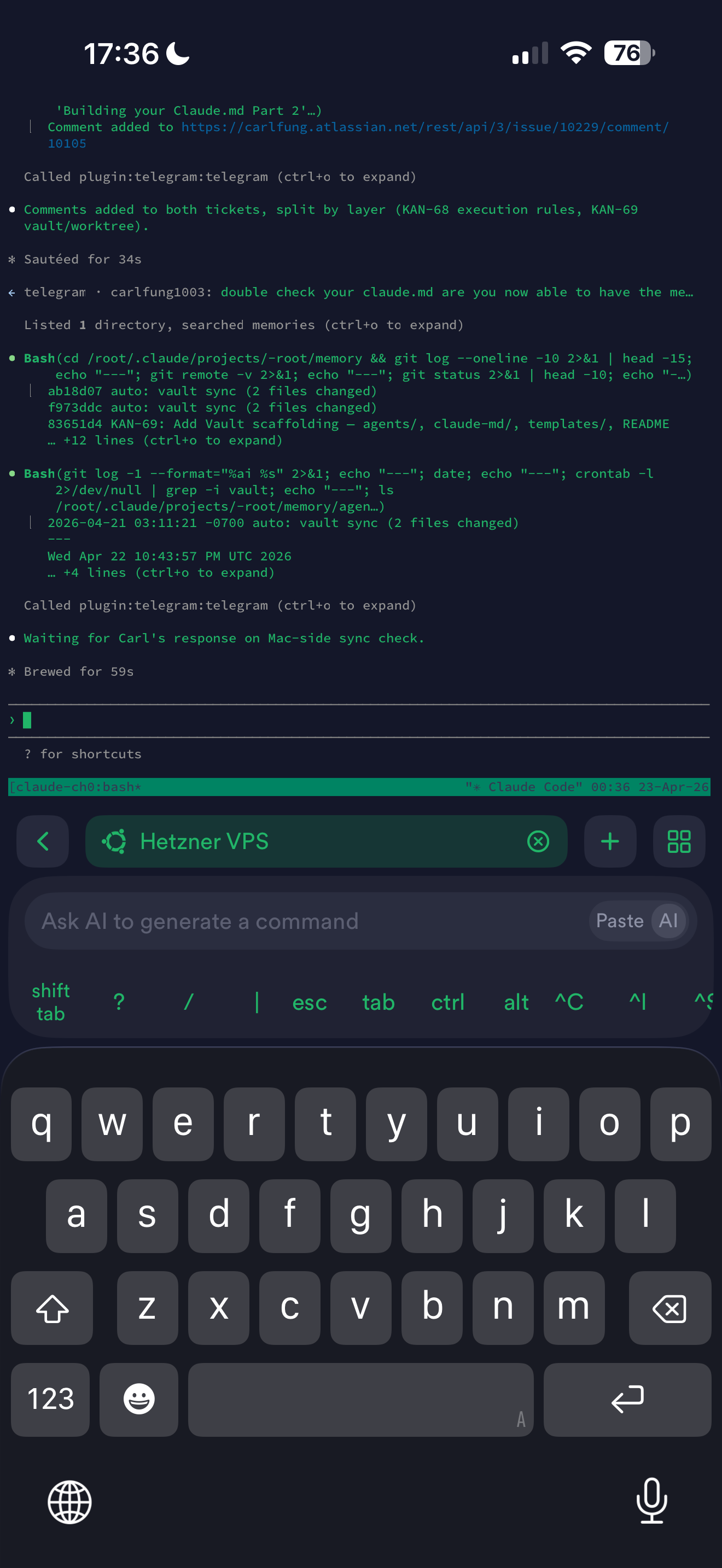
But SSH over the public internet from random hotel Wi-Fi has two things against it: port 22 has to stay open to 0.0.0.0 (fail2ban helps but doesn't eliminate the exposure), and mobile networks do weird NAT things that can drop sessions mid-thought.
Step 4 — Tailscale for the mesh
Tailscale is a WireGuard-based mesh VPN. Each device authenticates once via a web flow and gets a stable 100.x.x.x IP that other devices on your mesh can reach. No ports open to the internet, no key distribution hell.
What Tailscale bought me:
- Close SSH to the public. Port 22 now reachable only from my Tailscale mesh.
- Stable internal DNS. I SSH to
my-vpsinstead of an IP. Tailscale resolves it. - No NAT surprises. Hotel, airport, mobile data, home — same mesh, same hostname.
- Free tier that's genuinely enough. 100 devices on the personal plan.
On the VPS:
curl -fsSL https://tailscale.com/install.sh | sh
tailscale up
# Follow the auth URL, done.
On the phone: install the Tailscale app, sign in, flip it on. Termius (or Termux) inherits the mesh — SSH to the Tailscale hostname works immediately.
After Tailscale was up, I changed the Hetzner Cloud Firewall to allow SSH only from Tailscale's address range (100.64.0.0/10). The VPS's public IP now refuses SSH from the open internet entirely.
0.0.0.0/0100.64.0.0/10Step 5 — tmux: the session that outlives your phone
The one thing mobile SSH sessions do unreliably: stay connected. Your phone locks, backgrounds the SSH app, switches networks, and the session drops — sometimes mid-Claude-Code-run.
tmux decouples the shell from the SSH session. Run claude inside a tmux pane and when your SSH dies, tmux keeps running on the server. Reconnect, tmux attach, you're back in the same Claude Code conversation.
# First time
tmux new -s work       # named session
# ... run Claude Code, do work ...

# SSH drops / phone locks / flight takes off

# Reconnect — from any device
ssh my-vps
tmux attach -t work    # back exactly where you left off
Once tmux attach became the first thing I typed after every SSH, the mobile-ness of the setup disappeared. It was just a terminal.
The Hong Kong moment
A few days into this setup, I was in a Hong Kong hotel, laptop intentionally left behind that morning to lighten my bag. An n8n workflow I'd built earlier that week was failing silently and I wanted to debug it before the context rotted out of my head. At a dim sum place, I did this:
ssh my-vps. tmux attach -t work.That would have been impossible from a phone browser. Every tool Claude Code needed — MCPs, skills, memory, git, npm — lives on the VPS. The phone was just the screen.
What this costs and what it doesn't
Monthly: €3.79 Hetzner + $0 Tailscale (free tier) + Termius (free tier works; their paid tier is nicer) = roughly $4/month total.
One-time: about three hours end-to-end, including the UFW misconfiguration I gave myself before realizing Hetzner's Cloud Firewall was the right primitive. Without that detour, an hour is enough.
Not monetary but real: phone typing is slower. Screen is small. A bluetooth keyboard and a 10" tablet is a much better travel setup for trips over a few days. I'll do that next time.
What I'd do differently
Install Tailscale on day one. I ran with public-IP SSH for a few weeks before adding it. Unnecessary attack surface, and Tailscale is a five-minute install. Don't procrastinate it.
Don't hesitate on ARM. Claude Code, Node, Python, Docker, git, the Anthropic SDK — all work great on ARM. I spent ten minutes worrying about compat before installing. Zero minutes of actual compat problems.
Git your config from the start. I did this afterwards — copying Claude Code state from Mac to VPS was a rsync-and-hope instead of a git clone. Starting fresh, put your ~/.claude/ in a private repo and clone it onto the VPS.
Don't over-harden. I spent an hour on UFW then locked myself out when it clashed with Docker's iptables rules. Hetzner Cloud Firewall + fail2ban + Tailscale is enough. More isn't better.
The realization underneath all this: Claude Code is a networked agent, not a local app. It talks to the Anthropic API, reads your files, runs commands. None of that needs to live on the same device as your keyboard. Put it on a server you trust, reach it through a mesh, and your dev environment is wherever you are — including a noodle shop in Tsim Sha Tsui with a phone in your hand.