Zero to 35 Skills in One Evening
Zero to 35 Skills in One Evening
I opened Claude Code for the first time on a Thursday afternoon. By midnight, I had 35 installed skills, two MCP servers connected, and a CLAUDE.md file that would become the operating manual for an entire AI agent ecosystem.
This is the story of Day 1.
The Setup
Claude Code is Anthropic's CLI tool — a terminal-based AI assistant that can read files, run commands, search codebases, and (critically for what I was about to build) connect to external services through the Model Context Protocol (MCP).
I'm a TPM. My daily work lives across Jira, Confluence, Slack, Google Calendar, and about a dozen Google Sheets. The first thing I did was connect Claude Code to these systems.
MCP: The Bridge to Everything
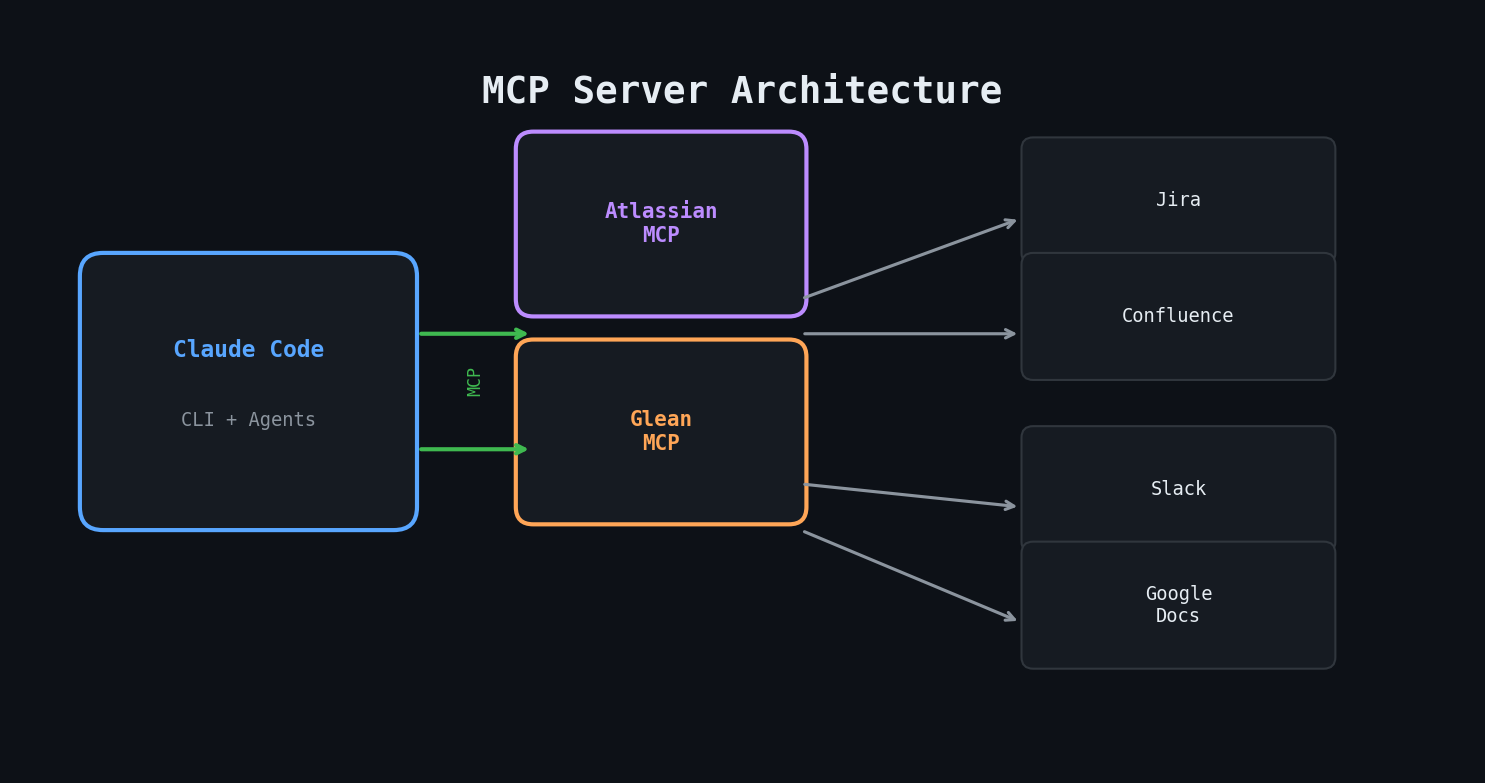
MCP servers are how Claude Code talks to the outside world. I configured two:
- Atlassian MCP — Jira issues, JQL queries, Confluence page reads and writes
- Glean MCP — Enterprise search across Slack, Google Docs, Confluence, and more
The configuration lives in a JSON file. Once connected, Claude Code can run JQL queries, read Confluence pages, and search Slack channels as naturally as it reads local files.
```json { "mcpServers": { "atlassian": { "command": "npx", "args": ["-y", "@anthropic/mcp-atlassian"] }, "glean": { "command": "npx", "args": ["-y", "@anthropic/mcp-glean"] } } } ```
CLAUDE.md: Teaching the AI Who You Are
The single most important file in my setup is `CLAUDE.md`. It's a markdown file that Claude Code reads at the start of every session. Think of it as a system prompt that persists across conversations.
Mine started simple:
- Identity: Who I am, what projects I manage, what tools I use
- Communication style: Be direct. No preamble. Bullet points over prose.
- Safety rules: Never modify Jira without asking. Never commit code without confirmation.
This file would grow to over 200 lines by week's end, but the foundation was set in the first hour.
The Skill Spree
Claude Code has a skill system — installable packages that give it specialized capabilities. I went through the catalog and installed everything that looked useful:
- Development: senior-frontend, senior-backend, senior-architect, senior-fullstack
- Content: email-composer, content-research-writer, seo-optimizer
- TPM-specific: jira (ticket lookup and sprint management), agent-development (for building custom agents later)
- Productivity: xlsx, docx, pptx, pdf, file-organizer
35 skills in total. Most of them I wouldn't use daily, but having them available meant Claude Code could handle whatever I threw at it.
I also created my first custom skill: `daily-meeting-update` — an interactive standup interview that asks four questions (what did you do yesterday, what are you doing today, any blockers, discussion topics) and formats the answers into a clean markdown update.
What I Learned
CLAUDE.md is everything. The quality of every interaction with Claude Code depends on how well you've defined your context. Vague instructions produce vague results. Specific identity, clear rules, and explicit preferences produce an AI that actually works like a teammate.
MCP connections are the multiplier. Claude Code without MCP is a smart text editor. Claude Code with MCP is a system that can pull live sprint data, read meeting notes, and search across your entire company's knowledge base. The gap between those two things is enormous.
Skills are cheap insurance. Installing 35 skills took maybe 20 minutes. Most sit dormant, but when you need specialized capability — generating a spreadsheet, reviewing a PR, drafting an email — it's already there.
Cost
17 sessions. $27. Mostly exploration and configuration. The expensive days were coming.
Key Takeaways
- Start with CLAUDE.md — define identity, communication style, and safety rules before doing anything else
- Connect MCP servers early — they transform what Claude Code can do
- Install skills broadly — the cost is near-zero and availability compounds
- Keep your first session exploratory — understand the tool before asking it to build things